
About this project:
This is a simple gym app which I built using the Hevy API. It uses the API to find exercises, get data from previous workouts and post new workouts.
Unity
C#
Solo project
This is a simple gym app which I built using the Hevy API. It uses the API to find exercises, get data from previous workouts and post new workouts.
In order to properly utilize the API, I made a request function which makes use of generic request and response classes.
	public IEnumerator WebRequest<TRequest, TResponse>(string url, RequestType requestType, TRequest request = default, Action<TResponse> onComplete = null)
    {
        // Serialize request to JSON
        string json = JsonConvert.SerializeObject(request, Formatting.Indented,
            new JsonSerializerSettings { NullValueHandling = NullValueHandling.Ignore });
        byte[] bodyRaw = Encoding.UTF8.GetBytes(json);

        // Create request manually
        using (UnityWebRequest webRequest = new UnityWebRequest(url, requestType.ToString()))
        {
            if (requestType == RequestType.POST)
            {
                webRequest.uploadHandler = new UploadHandlerRaw(bodyRaw);
            }
            webRequest.downloadHandler = new DownloadHandlerBuffer();

            // Headers
            webRequest.SetRequestHeader("Content-Type", "application/json");
            webRequest.SetRequestHeader("api-key", _apiKey.text.Trim());

            webRequest.timeout = 10;
            yield return webRequest.SendWebRequest();

            // Handle errors
            if (webRequest.result == UnityWebRequest.Result.ConnectionError ||
                webRequest.result == UnityWebRequest.Result.ProtocolError)
            {
                Debug.LogError($"Request failed: {webRequest.error}");
            }
            else
            {
                if (!string.IsNullOrEmpty(webRequest.downloadHandler.text))
                {
                    try
                    {
                        TResponse response = JsonUtility.FromJson<TResponse>(webRequest.downloadHandler.text);
                        onComplete?.Invoke(response);
                    }
                    catch (Exception ex)
                    {
                        Debug.LogError($"Failed to parse response: {ex.Message}");
                    }
                }
                else
                {
                    Debug.LogError("Received an empty or null response");
                }
            }
        }
    }
In order to search exercises, I had to get all the exercises first. Which was quite frustrating because the API only allows 100 exercises per request, and in total there are over 400 exercises.
	IEnumerator GetAllExercises()
    {
        List<Coroutine> running = new List<Coroutine>();
        List<bool> done = new List<bool>();

        // Start all requests
        for (int i = 0; i < 5; i++)
        {
            done.Add(false);
            int index = i;

            running.Add(StartCoroutine(GetExercisesRequest(
                _baseUrl + $"?page={i+1}",
                () => done[index] = true
            )));
        }

        // Wait until ALL are done
        while (done.Any(x => x == false))
            yield return null;

        ExerciseNamesLower = ExerciseNamesDict.Keys.Select(x => x.ToLower()).ToArray();
        ExerciseNames = ExerciseNamesDict.Keys.ToArray();
        OnExcercisesLoaded?.Invoke();
    }
    private IEnumerator GetExercisesRequest(string url, UnityAction onComplete = null)
    {
        yield return _packageManager.WebRequest<object, ExerciseTemplatesResponse>(url, RequestType.GET, null, response =>
        {
            onComplete?.Invoke();
            foreach (var exercise in response.exercise_templates)
            {
                ExerciseNamesDict.Add(exercise.title, exercise);
            }
        });
    }
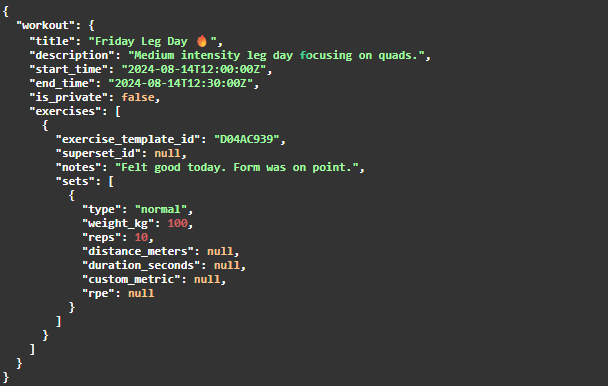
The workout creator keeps track of all the exercises and sets, and creates a workout object which is used to post the workout through the API.
I haven't used all of the functionality provided by the workout class, such as notes, supersets, description and the ability to controll the visibilty of the workout.
	public void AddExercise(string exerciseName)
    {
        UIExercise uiExercise = Instantiate(uiExercisePrefab, workoutPanel);
        uiExercise.Init(exerciseName);
        _exercises.Add(uiExercise);
    }

    public void FinishWorkout()
    {
        _workout.title = "First actual workout from Unity";
        _workout.end_time = DateTime.UtcNow.ToString("yyyy-MM-ddTHH:mm:ss.fffZ");
        List<Exercise> exercises = new();
        foreach (UIExercise uiExercise in _exercises)
        {
            List<Set> sets = new();
            foreach (UIExerciseSet set in uiExercise._sets)
            {
                if (!set._completed) continue;
                set.Set.type = set._setTypeDropdown.options[set._setTypeDropdown.value].text;
                set.Set.weight_kg = float.Parse(set._weightText.text);
                set.Set.reps = int.Parse(set._repsText.text);
                sets.Add(set.Set);
            }
            uiExercise._exercise.sets = sets.ToArray();
            exercises.Add(uiExercise._exercise);
        }
        _workout.exercises = exercises.ToArray();

        WorkoutCreateRequest request = new();
        request.workout = _workout;
        StartCoroutine(CreateWorkoutRequest(request));
    }
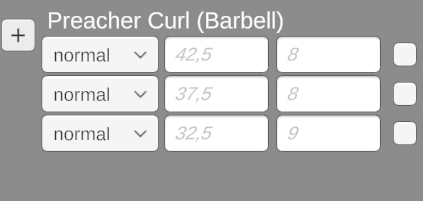
I wanted to be able to see what amount of weight and reps were done the previous time an exercise was done, relative to their set index.
I did this by looking up all the sets done of an exercise in the past month, then when a set is added to the exercise in the workout, check the closest set with the same index.
	public void Init(string exerciseName)
    {
        _packageManager = PackageManager.Instance;
        string templateId = GetExercises.Instance.ExerciseNamesDict[exerciseName].id;
        _exercise.exercise_template_id = templateId;
        _exerciseNameText.text = exerciseName;
        AddSet();

        // get exercise history
        string startDate = DateTime.UtcNow.AddMonths(-1).ToString("yyyy-MM-dd");
        string endDate = DateTime.UtcNow.ToString("yyyy-MM-dd");
        string url = $"{_baseUrl}exercise_history/{templateId}?start_date={startDate}&end_date={endDate}";
        StartCoroutine(GetExerciseHistory(url));
    }

	private IEnumerator GetExerciseHistory(string url)
    {
        yield return _packageManager.WebRequest<object, ExerciseHistoryResponse>(url, RequestType.GET, null, response =>
        {
            List<DateTime> dates = new();
            for (int i = 0; i < response.exercise_history.Length; i++)
            {
                HistorySet set = response.exercise_history[i];
                if (!dates.Contains(DateTime.Parse(set.workout_start_time).Date))
                {
                    _exerciseHistory.Add(new Dictionary<HistorySet, int> { { set, 0 } });
                    dates.Add(DateTime.Parse(set.workout_start_time).Date);
                    continue;
                }
                _exerciseHistory.Last().Add(set, _exerciseHistory.Last().Count);
            }
        });
    }

    private IEnumerator FindPreviousSetData()
    {
        yield return new WaitUntil(() => _exerciseHistory.Count > 0);
        UIExerciseSet currentSet = _sets.Last();
        int index = _sets.IndexOf(currentSet);
        foreach (var historyDict in _exerciseHistory)
        {
            foreach (var kvp in historyDict)
            {
                HistorySet historySet = kvp.Key;
                int setIndex = kvp.Value;
                if (setIndex != index) continue;

                currentSet.SetPreviousData(historySet.weight_kg, historySet.reps);

                yield break;
            }
        }
    }